Work
1 stopped by limitHit the limit. Keep the conversation.
Porter carries your Claude Code sessions from an account at its usage limit to one with room left, so you pick up right where Claude stopped.
Example data
- Claude stops the session at the limit.
- Porter carries it to an account with room.
- Same conversation, new account.
The conversation never belonged to an account.
Claude Code keeps every conversation in its own folder on your Mac, shared by all accounts. What belongs to an account is only Claude Desktop's short list of sessions. Porter moves the entry in that list, clears the limit error and brings along the git worktrees the session uses.
- Before every change Porter makes a backup, and anything it deletes goes to the Trash.
- A running Claude Desktop keeps its list in memory, so Porter quits it first and opens it again afterwards.
Several Claude Desktops, side by side.
Claude Desktop normally runs one account at a time. With Porter, each profile is its own Claude Desktop with its own sign-in, settings and sessions, in the Dock and in ⌘-Tab like any app. When one account runs out, keep working in the next window.
Optionally, Claude links from the browser open in the profile you used last.
Example data
Work
you@work.example
Personal
you@home.example
Example data
Every account at a glance.
Click the porter in the menu bar: each account shows its 5-hour and 7-day usage, the sessions stopped by a limit, and one button to move them where there is room.
Live usage, when you want it.
Turn on Live Usage and Porter asks claude.ai every few minutes, with each profile's own session, as Claude's usage screen does. You also see when each limit resets, and limits that apply to one model only, such as Fable.
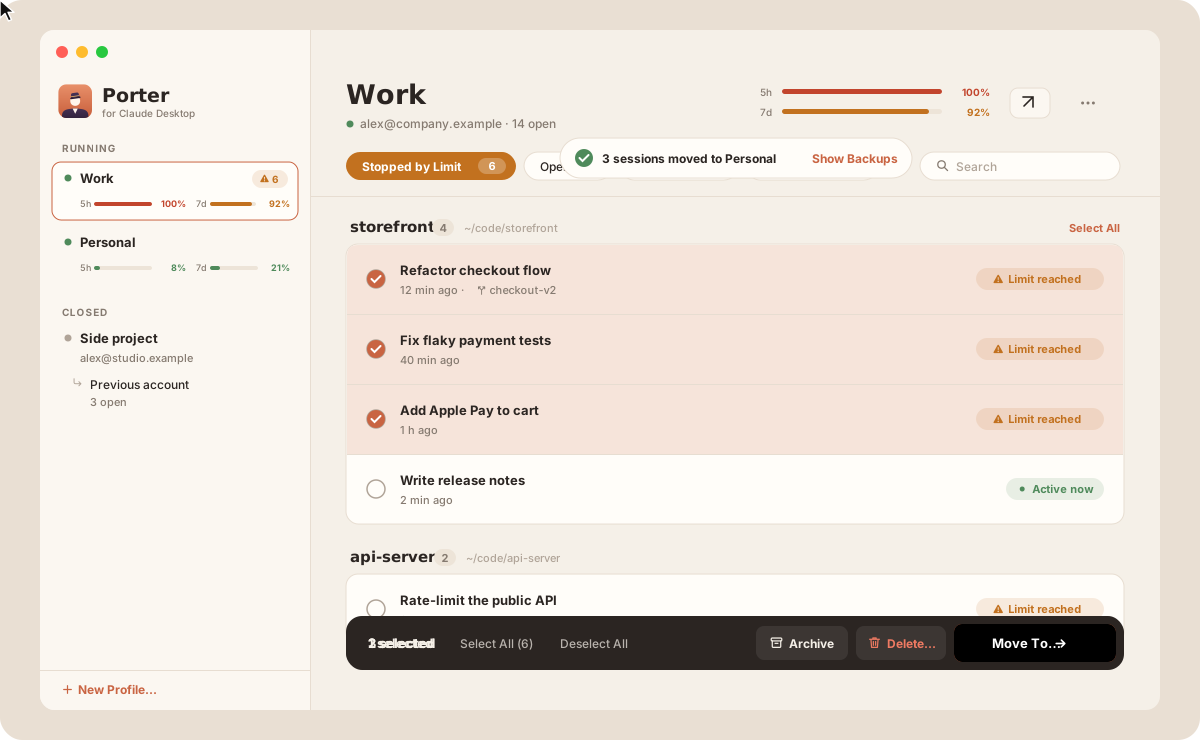
All your sessions, in one window.
- Sessions grouped by project, with search and filters
- Move or copy them to another account, or drag them onto it
- Archive, restore and delete, with a backup before every change
- Move a project folder and every session that uses it follows
And from the command line.
The same app moves sessions from your scripts.
$ alias porter="/Applications/Porter for Claude Desktop.app/Contents/MacOS/Porter"$ porter --list # accounts, profiles and their session lists$ porter --move --from WORK --to PERSONAL --dry-run # what would happen, without changing anything$ porter --move --from WORK --to PERSONAL --restart # move, closing and reopening Claude DesktopInstall in a minute.
-
Download
Get Porter.dmg, open it and drag Porter to Applications.
Porter.dmg -
Allow it once
Porter is not notarized, so macOS blocks the first launch. Open System Settings → Privacy & Security and click Open Anyway, or run:
xattr -dr com.apple.quarantine "/Applications/Porter for Claude Desktop.app" -
Sign in and go
Click the porter in the menu bar, make a profile for each account and sign in. From then on Porter updates itself.